
Open source. Open conversations.
Robrix
Make room for
your conversations.
A native Matrix client built in Rust. Arrange rooms and threads side by side, with a layout that works for you.
v1.0.0-beta.2macOS · Linux · Windows · Android · iOS
Your conversations, your layout
A little more room to talk.
Keep a thread beside its room, follow a few conversations together, or give one room your full attention. Split, stack and drag tabs into place — Robrix remembers your layout.
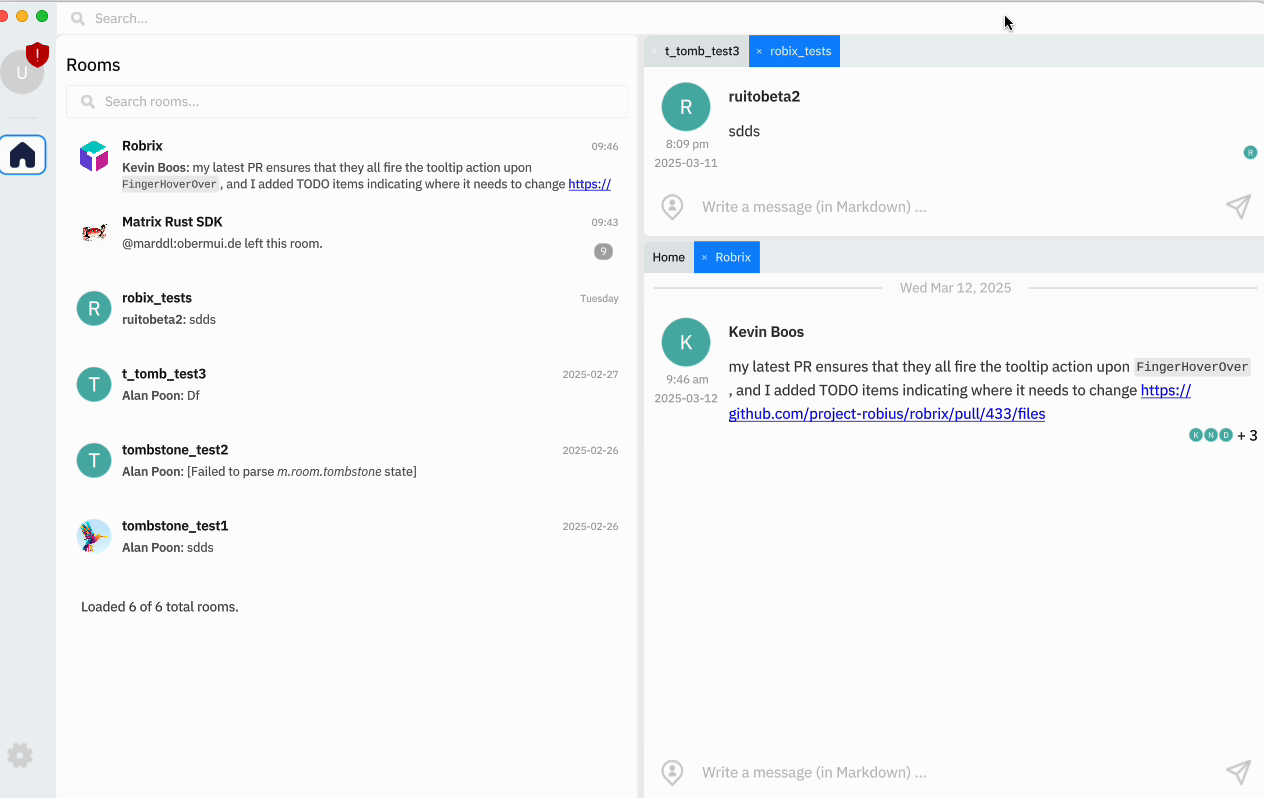
Dockable tabs
Arrange rooms and threads side by side, or stack them in tabs. Your layout is saved between launches.
A timeline that stays put
Keep your place in a conversation while older messages, images, and previews load around you.
Native sliding sync
Get connected and bring your rooms up to date with native sliding sync. Requires a homeserver that supports it.
Made for Matrix
Built in Rust.
- Native UI
- GPU rendering
- Open source
Robrix pairs Makepad's GPU-rendered interface with the Matrix Rust SDK for messaging and encryption. One Rust codebase brings that experience to desktop and mobile.
What it does
Ready for the conversation.
Explore what's available in the Robrix beta, from encrypted messaging to voice dictation and offline access. There's more on the way, and your feedback helps shape it.
End-to-end encryption
Device verification in one click from Account Settings, encrypted media, and a send button that tells you whether the room is encrypted.
Key backup and recovery
Back up your encryption keys with a recovery key and restore them on a new device. Robrix reminds you at launch if you have no backup yet, so your history is not lost.
Every message, tracked
Each message shows where it actually is: uploading, sent, queued because you are offline, or failed. Retry or cancel anything that did not make it, attachments included.
Voice dictation
Tap the mic in the message box and talk. Dictation uses the speech recognition built into macOS, iOS, Android and Windows, and you can keep typing while it listens.
Members, pins and threads
A room's action bar opens panes for its members, pinned messages and threads. Resize them, move them to any side, or pop one out into its own tab.
Threads and replies
Threaded replies, replies into a new thread, and reply previews that expand, collapse and render full rich text.
A tidier timeline
Runs of joins, leaves and profile changes fold into one short summary, even across days or months. Expand a group whenever you like, and the timeline stays where you left it.
Mentions that keep up
Autocomplete for users, rooms and @room stays fast even in huge rooms, with a proper pop-up that keeps up as you type.
Slash commands
/me, /notice, /spoiler, /shrug, /rainbow, /invite, /dm, /whois, /ignore, /nick and /leave, sharing the autocomplete pop-up that mentions use.
Files and media
Upload, download and share attachments, including encrypted media, with captions. PNG, JPEG, GIF, WebP, BMP, ICO, QOI and SVG, in an image viewer that pinch-zooms like Android and iOS.
Works offline
A persistent event cache means your history is there before the network is. Write while you are disconnected and the send queue posts it for you when you come back.
Read receipts you control
Send them publicly or privately, mark a room read on scroll or by hand, or hide receipts altogether. Unread badges stay in sync across every category in the rooms list.
Sign in your way
The login screen shows only what your homeserver supports: browser login over OAuth 2.0, legacy SSO, or a password. You can create a new account there too.
Spaces, DMs and invites
Dedicated views for spaces and direct messages, keyword filters over the rooms list, and knock to join. Invites show the room's topic and member count, and you can reject and block in one step.
Keyboard and text input
Single and multi-line inputs that behave the way you expect, with full keyboard navigation, selection shortcuts and CJK IME support.
Scrolling that feels right
Kinetic movement, correct acceleration and bounce on touch and trackpad — tuned to match the native apps on each platform.
Zoom the whole UI
Smoothly scale the entire interface up or down on every platform with the shortcuts you already use.
Faster on Linux and Android
On Wayland, Robrix renders with Vulkan when a hardware driver is available and falls back to OpenGL ES when not. Screens open faster the first time, especially on Android.
What's next

Desktop and mobile
Your devices. One codebase.
Robrix's Rust codebase and Makepad interface run across macOS, Linux, Windows, Android, and iOS. Here is how to build it yourself.
$cargo run --release$cargo makepad android run -p robrix --release$cargo makepad apple ios --org=rs.robius --app=robrix run-sim -p robrix --release
One crate and one shared source tree, with contributions that reach every platform.
- macOS
- Linux
- Windows
- Android
- iOS & iPadOS
- OpenHarmonyin progress
Builds are available for 5 platforms, with OpenHarmony support in progress. See all downloads →
Part of an open community
Built together, in the open.
Robrix is made possible by Matrix, Rust, Makepad, and Project Robius. We're grateful to the people building these tools and the wider family of Matrix clients.
Language
Rust
The language behind Robrix, bringing memory safety and native performance to desktop and mobile.
UI toolkit
Makepad
A GPU-rendered, shader-driven UI toolkit for Rust. Robrix is its flagship app, and the team contributes to it heavily.
Protocol
matrix-rust-sdk
The official Rust implementation of Matrix, including the encryption stack and the sliding sync client.
App framework
Project Robius
The framework and platform integrations that help bring Rust applications like Robrix to desktop and mobile.
We contribute improvements back to Makepad as we build Robrix. Explore the Matrix ecosystem →
Join the conversation.
Try the Robrix beta, share your feedback, and help shape what comes next. Free and open source under the MIT license.